akailogopaars

AKAI Z4 / Z8 & MPC4000 MNX2010 SITE


akai_z8_main
--- Last Update 19 November 2025 - Since the year 2013 !!! So now 12 Years ! ---

Z8 MAINSITE z8hardware z8software.htm driverbutton


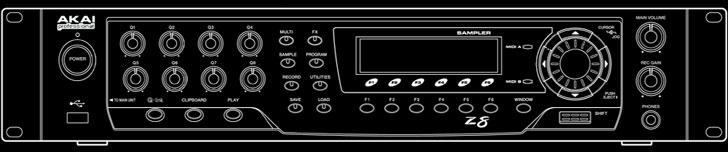
Akai Z8 Specifications:

z8pic44.jpg

Synthesizer Section
Maximum Polyphony :64-Voices (32-Voices: 96kHz)
Memory Capacity :16MB, expandable to 512MB using 168-pin SDRAM DIMMs (PC133/PC100, CL2, ECC/Non, 256MB max.) 2 slots
Sampling Frequency :44.1 kHz, 48 kHz, 96 kHz
Total Sampling Time :180/120 (16/24bit) seconds mono 44.1kHz
166/110 (16/24bit) seconds mono 48kHz
83/55 (16/24bit) second mono 96kHz
90/60 (16/24bit) seconds stereo 44.1kHz
83/55 (16/24bit) seconds stereo 48kHz
41/27 (16/24bit) seconds stereo 96kHz
Filter :Digital dynamic multi-mode filter (2-pole x 3 with resonance) per voice
Envelope Generators :3 x Digital Envelope generators (2 multi-stage) per voice
LFOs :2 x Multi-Wave Low Frequency Oscillators per voice

nofrnt

Others
Display :Backlight 248 x 60 dot graphic LCD
Drivebay :3.5 inch x 1 (ATA)
Connectors :Inputs x 2, Outputs x 2, Phones, MIDI IN x2, MIDI OUT/THRU x2, SCSI interface. Outputs x 8, S/P-DIF digital I/O 2 x RCA input/output.
Accessories :AC power cable, operators manual, Sound Library Disc, Cable set for IDE drive.
Dimensions :483(W) x 415(D) x 91(H) mm
Weight :6.4 kg

nofrnt

The 3 options to replace your old hard drive

FAST ! - ZuluSCSI Blaster (RP2350B) (around 100 euros)

The ZuluSCSI Blaster (SCSI2SD) was released in April 2025. It can read up to 18 MB/s and write
up to 11 MB/s and supports Ultra SCSI (20 MB/s). (ZuluSCSI RP2040 : Maximum read speed 4 MB/sec.)
It's definitely moving in the right direction. The question is whether this high speed is in the sampler.

The sampler must be SCSI-2 standard to achieve these high speeds. That's certainly the case with the Z-Series.
The SCSI-2 standard enabled faster operation (10 MHz) and wider buses (16-bit or 32-bit).
At 10 MHz with a bus width of 16 bits, a data rate of 20 MB/s is possible. The question is what speed
will ultimately be achieved. Perhaps the bottleneck is the sampler itself, which is causing the speed
to be a bit disappointing, but for the Z-Series things look rosy. 2025f is the same as RP2350B.

Buy Zuluscsi Kit > Samplerzone.com        More Info and Buy > Zuluscsi.com

Amigastore.com > Bay Bracket 3.5" SCSI2SD ZuluSCSI      ZuluSCSI Blaster RP2350B

ZuluSCSI_Blaster

IDEtoSD IDEtoCF DigiDriveIDE

MID ! - IDE2SD or IDE2CF or both? (around 30 euros)

For SD & CF converting use IDE adapters for the Z4/Z8 & MPC4000, simpler and more cheaper than SCSI
adapters and so easy to install, only format in FAT32. For SD & CF larger than 512MB, use a computer to format. 
Addonics.com >>> IDE - CF Adapter (Supported memory list and info)

The answer to the question of which is best: the IDE2SD! SD is still preferable to CF.

I had an incident with a card reader that destroyed a CF. One of the legs was bent and destroyed the CF card,
luckily I had a backup! You won't experience that with an SD card, which is much more robust.
It's not for nothing that almost everything is SD these days. You can purchase a kit or the IDE2SD board and
the 3.5-inch bay separately. Or, you can 3D print the 3.5-inch bay. Also take a look at the HD Replace Workshop.

IDE2SD Card 40Pin Male IDE HD converter > Ebay        Floppy drive Bay SD to IDE (printed out) > Ebay

IDE2SD Floppy drive bay (3D print file) > Thingiverse        IDE2SD Floppy drive bay (3D print file) > Printables

KIT : floppy drive bay (printed out) & SD to IDE hard drive adapter (40 pin) > Zzxio

SLOW ! - USB-Stick startup disk (around 10 euros)

To use the USB-Stick as startup disk on the Z4/Z8, you need to disconnect the harddisk-connectors.
Better even remove the harddisk, because it’s noisy, slow, old & unreliable. Format your stick as FAT32.
The stick/partition should not be larger than 32GB. Copy programs and samples in an autoload folder.
That’s it, the power on and it will load automatically, a lot slower as CF & SD, but very cheap solution.

I use the synthy banks 1 & 2 in total 66MB. The outcome of the test :

SD & CF >>> Start Load - 13 sec >>> End Time - 1:22 sec
USB >>> Start Load - 54 sec >>> End Time - 2:47 sec

Z8_USB

Conclusion : USB is much slower than SD & CF and it will take some time to find the USB-Stick.
In fact 41 sec more than SD & CF and the loading time is round a minute (for a 66MB) slower.
As predictable, the fast data converters are expensive and the slow are cheap ... MNX2010 Nov'25


Q-Link:

Q-Link has only 8 channels real-time controller. So before you assign the parameter data, try out 
(front panel Q-Link controls), witch one of the controller data is effective. The one I like the most
is the Cut-off & Resonance, especially with synthesiser and effects sounds. For drums I like more 
Reverb & Flanger. The Q-Link controls are recordable and transmit and receive real-time controller data. 

To optimize the controller data. Use the separate tracks for every controller number-parameter. Go to the 
list editor in Cubase or any other DAW, delete all other data controllers for volume and program change, 
if you don’t use it, delete it ! Now select the all controller data and go to Quantize and delete doubles. 
Remember MIDI is still slow ! ..... MNX2010 March'18. 

AKAI Z4 / Z8 & MPC4000 YouTube Playlist

Click here for Info

z8pic001

AKAI Z8 Links :
----------------------------------------------------------------
Akaipro.com >>> find international-distributors
Sweetwater.com >>> AKAI Z8 Review
Supersonica.it(RIP) >>> AKAI Z8 Promotion
Synthony.com/Museum(RIP) >>> AKAI Z8 INFO
Gearslutz.com >>> AKAI Z8 Forum / Tips
Synfo.nl >>> Service Manual MPC4000
----------------------------------------------------------------
aksys2.ltrans
Made for min 1024 pix screen resolution
EMAILME for more info


-----------------------------------------------------------------
  ##### Copyright (C) 2013 MNX 2010. All rights reserved. #####
****** THANKS TO Eric Trooster AND OTHERS FOR SUPERVISION  ******
-----------------------------------------------------------------


mnx logo

>>> To MNX2010 MainSite <<<
© MNX2010 Web & Logo Design
All rights reserved
MNX2010 mail link
Mailme for further information or suggestions


Back to TOP         

Search Engine Submission - AddMe     

Web Analytics
View My Stats Get SEO Backlinks Free Web Submission